
Claude Duet is Anthropic’s proactive AI assistant: you hand it work through messages, and it can use connected apps on a cloud computer, continue while you are away, and return with results or a decision for you. Its research preview is currently limited to invited Claude Pro and Max subscribers in the United States.
This guide answers the practical questions behind the launch: who can use it, what it costs, where its limits sit, and how to choose a sensible first task. For the announcement and wider context, read our Claude Duet launch report.
Checked: 25 October 2026. Product availability and pricing can change. This is a documentation-based guide, not a hands-on product review.
Claude Duet at a glance
| Question | Current answer |
|---|---|
| Who can access it? | US Claude Pro and Max subscribers invited from the waitlist. |
| Where does it run? | iOS, Android, and the web at claude.ai; the work runs in the cloud. |
| Separate Duet subscription? | No additional Duet charge during the preview; existing plan limits apply. |
| Team or Enterprise access? | Not included in the current preview. |
Check the official Claude Duet product page before subscribing specifically to obtain access. Paying for an eligible plan does not replace the invitation requirement.
Claude Duet pricing: included does not mean unlimited
Anthropic currently includes Duet in eligible Pro and Max subscriptions during the research preview. The underlying subscription still has a price. The official pricing page lists the following US dollar prices before applicable taxes:
| Plan | Listed price | Duet access condition |
|---|---|---|
| Pro, monthly | $20 per month | US waitlist invitation required |
| Pro, annual | $200 billed upfront for the year; advertised at about $17 per month | Same invitation requirement |
| Max | From $100 per month | Same invitation requirement |
These are Claude plan prices, not a separate Duet tariff or a guaranteed price after the preview. A higher subscription price should not be treated as a promise of faster admission.
Background work consumes your existing allowance
Anthropic’s usage-limit documentation explains the shared account allowance, including five-hour session limits and weekly limits. Conversation complexity, tools, and model activity affect consumption. Duet’s background checks also use plan capacity, as its launch announcement makes clear.
For a business owner, the useful calculation is how much accepted work the allowance produces. A report that takes repeated corrections can consume capacity while leaving the original job unfinished. Our AI agent ROI guide explains how to include review effort in that calculation.
How to join the Claude Duet waitlist
The official getting-started guide describes this process:
- Open the Claude Duet product page and choose Join the waitlist.
- Use the email address associated with your Claude account.
- Select your plan and phone type, then submit the form.
- Wait for an invitation email and follow its setup instructions.
Invitations arrive in waves. Anthropic has not supplied a guaranteed admission date. Users in India and other countries outside the US are not included in the documented preview eligibility.
How Claude Duet works, explained through an everyday task
Imagine a client meeting is coming up. Preparing for it may involve finding the latest email, checking an account record, reading a proposal, and writing a short brief. A helpful answer requires those pieces to agree: the correct company, the current terms, and the questions that remain unresolved.
A delegated assistant can tackle the preparation as a job with several steps. The quality of the result still depends on the available evidence. If an old proposal conflicts with a newer email, a useful brief should expose the disagreement instead of quietly choosing whichever version produces the smoothest answer.
In Anthropic’s documented design, Duet combines connected context with a cloud working environment. Your message supplies the objective; the connected services supply information or actions. Giving it a clear objective does not repair a missing record or decide which source your business considers authoritative.
A MEETING BRIEF, STEP BY STEP
- 1. Define the job
Specify the company, meeting, sources, and result you need.
- 2. Gather context
Use authorised records and flag missing or conflicting information.
- 3. Prepare the draft
Return a brief with evidence and outstanding questions.
- 4. Review the outcome
Check facts and approve any separately proposed external action.
How is that different from a chat or a fixed automation?
Chat, automation, and agent-led work can overlap. A chat can use connected tools, and a fixed workflow can call a language model. The useful distinction is how much of the next step is decided in advance.
| Approach | Example | What the person still defines |
|---|---|---|
| One chat request | Summarise the email thread you selected. | Which material to provide and what to do with the summary. |
| Fixed workflow | On a schedule, collect specified fields and fill a brief template. | The data sources, sequence, and exception rules. |
| Delegated agent task | Investigate the meeting context and prepare a sourced brief. | The objective, permitted sources, stopping point, and acceptable result. |
The more predictable the process, the stronger the case for explicit steps. The more investigation it needs, the more useful bounded flexibility may become. Our agents versus workflows guide develops that choice.
What can Claude Duet actually do?
Anthropic describes morning briefings, checking connected accounts, and assignments such as preparing dashboards, presentations, and forecasts. It brings across context from your Claude account, including memory, skills, and connected apps. These are documented capabilities and company examples, not independently measured results from AgentsCalling.
The practical difference is initiative: an ordinary chat begins when you open it and ask, while Duet is designed to surface work and follow up while you are away. Its cloud environment means your own device does not need to remain on.
A useful request still needs a finish line. “Help with sales” gives a reviewer little to check. “Prepare an account brief with the latest contract, open questions, and source links” defines a deliverable. See our guide to choosing a first AI agent workflow for a fuller selection framework.
Three business tasks worth evaluating
These are proposed exercises based on documented task types, not claims that AgentsCalling has tested their performance. In each case, the useful unit of work is a result you can inspect.
- A meeting brief: identify the correct account, recent correspondence, and outstanding commitments. Ask for supporting links and separate facts from open questions. Review whether the brief helps you enter the meeting prepared, rather than simply checking whether it sounds professional.
- An invoice reminder draft: compare the invoice with the latest customer correspondence before proposing a message. A disputed invoice and a forgotten invoice may need different treatment. Have a person check the amount, recipient, and tone before any external action.
- A weekly sales update: define the reporting period, the relevant account records, and what counts as a new or progressed opportunity. Ask the assistant to show gaps. A confident narrative is of little use if “pipeline” means something different in every source.
For each exercise, preserve the original inputs and your corrected output. Those give you a reference for judging the next attempt and identifying whether errors come from missing data, unclear instructions, or execution.
Which apps can it use, and what access are you granting?
Duet uses apps you connect through Claude; its help documentation lists examples including Gmail, Google Calendar, Google Drive, QuickBooks, and HubSpot. Compatibility should be checked for the individual service rather than assumed from the size of a marketplace catalogue.
Anthropic’s connector guide explains that connectors can retrieve data and perform actions, with access shaped by the connected account’s permissions. A connector using a shared credential can reach what that credential permits.
Before connecting an account, identify the information the task requires and whether the service exposes read or write actions. Access to an inbox and permission to send a customer message deserve separate consideration. Our analysis of persistent agent permissions explores why that distinction matters.
Current Claude Duet limitations
The getting-started documentation identifies several constraints:
- Microsoft 365 is not yet available in Duet, and some connectors have restrictions.
- You cannot watch or take over its browser during the preview.
- It cannot make phone calls or send texts to other people.
- It checks accounts at intervals and may miss something between checks.
- It can misunderstand a conversation or misjudge urgency.
For an urgent customer escalation, these limits change the operating decision: keep an existing alert channel and named owner in place. Test whether the assistant adds useful context before relying on its silence as evidence that nothing needs attention.
What needs approval, and what stays off-limits?
Anthropic’s safety explanation says consequential actions are subject to approval controls, with the action, destination, and content shown for review. It also describes a separate automated check against the user’s intent. Some steps cannot be covered by persistent approval, and some activities, including securities trading and moving money between accounts, remain prohibited even with permission.
The company describes credential isolation and checks for sensitive outgoing information, while acknowledging that safeguards can make mistakes. Disconnecting an app stops future access, but does not automatically remove information already retained in memory.
These are descriptions of the intended design, not a guarantee of perfect behaviour. MIXED’s independent coverage also highlights shared usage limits and the distinction between disconnecting access and clearing remembered information.
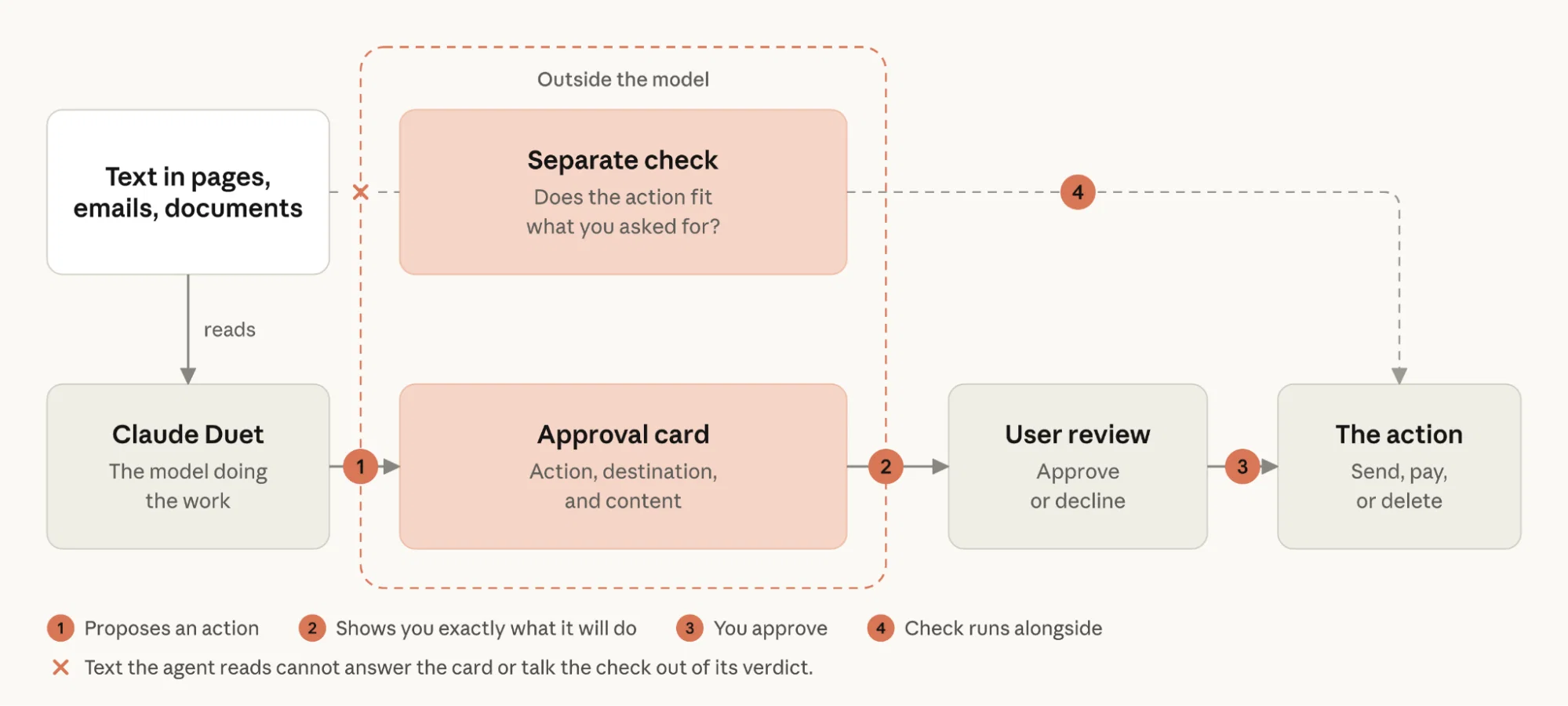
Reading a proposed action is part of the task
Suppose a reminder draft is accurate but addressed to the wrong contact. The wording alone would pass an editorial check, yet sending it could disclose information to the wrong person. An effective review checks the destination, the information included, and any commitment being made.
For a purchase, examine the item, quantity, merchant, and final total. For an appointment, inspect the people, time zone, and promised availability. Treat a changed recipient or amount as a changed decision. These are evaluation principles, not a claim about how every preview interaction behaves.
A practical first task: prepare a meeting brief
The following is an illustrative pilot proposed by AgentsCalling. It has not been run in Duet for this guide.
Prepare a brief for my next meeting with [company]. Use only the account records and email thread I identify. Include the meeting goal, outstanding questions, and links supporting each factual claim. Flag missing or conflicting information. Return a draft for review. Do not send messages, change records, or create calendar events.
Start with a test account or a small set of records you can inspect yourself. Then use this scorecard:
| Check | Evidence to record |
|---|---|
| Correct account | The brief concerns the intended company and meeting. |
| Supported facts | Claims link to relevant, current records. |
| Visible uncertainty | Missing or conflicting information is flagged. |
| Task boundary | No unrequested message or record change occurs. |
| Useful output | Record correction time, omissions, and usage consumed. |
Repeat the exercise on a few comparable cases, including one with incomplete information. Expand responsibility only when the results justify it. This gives a business a way to judge usefulness beyond the appearance of a polished document.
Write a task brief the result can be checked against
A practical delegation instruction has five parts: outcome, sources, boundaries, review point, and completion criteria. This is an editorial framework for writing clearer requests, not a special Duet command format.
- Outcome: name the deliverable, such as a one-page meeting brief.
- Sources: identify the account, thread, files, or date range.
- Boundaries: specify which changes or external actions are outside the task.
- Review point: say what you need to inspect before proceeding.
- Completion criteria: require evidence and a list of unresolved questions.
If an output is wrong, first check which of those elements was ambiguous. Adding a longer prompt without diagnosing the gap can make the next attempt harder to evaluate.
Who should consider the preview?
An invited user with a recurring, reviewable task can use the preview to investigate whether proactive assistance reduces administrative effort. Someone who needs immediate access, Microsoft 365 support in Duet, phone calls, or guaranteed real-time monitoring should assess those requirements before making a purchase decision.
The sensible starting point is one bounded workflow with an inspectable result. Measure whether finding information, checking it, and correcting the output takes less effort than your existing process.
Frequently asked questions about Claude Duet
Is Claude Duet free?
It has no additional Duet charge during the preview, but requires an eligible paid Claude subscription and an invitation. “Included” does not mean unlimited usage.
Is Claude Duet available in India or the UK?
The documented preview is US-only. Anthropic has not announced a general international release date in the sources checked for this guide.
Does a Pro or Max subscription guarantee access?
No. An invitation is still required. Joining the waitlist does not establish a start date.
Can Claude Duet keep working when my laptop is off?
Yes, according to Anthropic. Its working environment is in the cloud, so your device does not need to remain on.
Does it have a separate usage allowance?
No separate preview allowance is documented. Background checks and larger jobs draw on the same plan capacity as your other Claude work.
Can it use Microsoft 365 or make phone calls?
Neither is available in Duet’s documented preview. It also cannot send texts to other people. Check those requirements before planning a workflow.
Can I watch or take over its browser?
Not in the current preview. That limitation matters if your process requires direct inspection of each browser step.
Does disconnecting an app erase what Duet remembers?
No. Anthropic distinguishes stopping future app access from clearing retained memory. Review both controls when removing a connection.
Will it ask before every action?
Avoid assuming a universal rule. Anthropic describes approval controls for consequential actions, automatic intent checks, and some activities that stay prohibited even with permission.
What is a sensible first task?
Choose a small, reviewable deliverable such as a meeting brief. Specify the sources and boundaries, then compare the output with information you already know.
Research note: Prepared with AI-assisted research and drafting. Product claims were checked against Anthropic’s product page, announcement, pricing, help documentation, and safety explanation, and compared with independent reporting. AgentsCalling has not independently tested Claude Duet. Hypothetical prompts and evaluation criteria are identified above.
About Puneet Sharma

Puneet Sharma · Freelance Writer
Puneet Sharma is a freelance writer covering AI agents, automation and the software changing how we work. His coverage at AgentsCalling starts with the questions a reader might ask over a conversation: What does this tool actually do? Where does it fall short? And is it useful beyond the demo? His articles explore new launches, practical workflows and the trade-offs behind giving software more responsibility, with explanations that make room for readers who are still getting familiar with AI.